ReIcon is a desktop icon organization and layout software
Software introduction
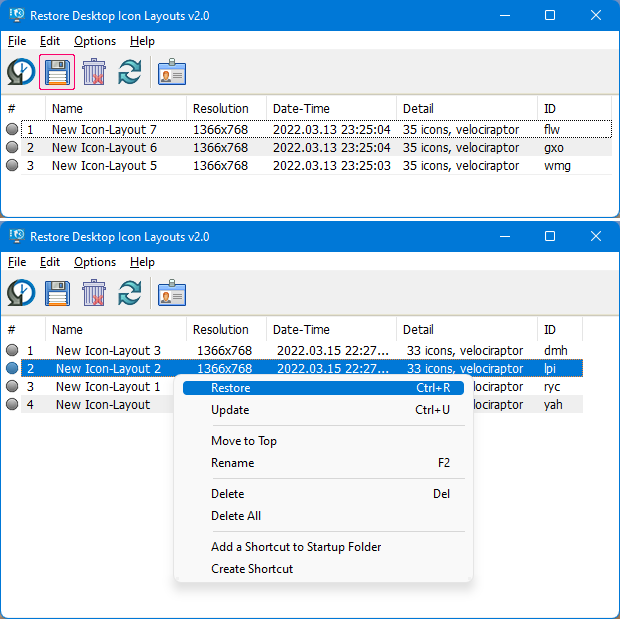
Reicon is portable free software that enables you to save and restore desktop layouts. If you frequently change screen resolutions (for example, playing games or using applications that require a specific resolution), you may be familiar with the problem of desktop icons getting messed up after you switch back to the normal resolution. Reicon solves this problem by allowing you to save your desktop layout and then restore it with the click of a button (or use the right-click context menu).
Reicon is very easy to use. Set up your icons the way you like them, save the layout, and then restore the layout later if needed.
How to use
GUI operation
- Position the icon you want to the coordinates you want
- Click on the Reicon program and save the layout
- Select the layout you want to restore, right-click on the layout list and select Restore
Command line usage
Reicon also supports command line operations. The following is a command operation guide.
  Usage: <command> [<additional commands>]

  Commands:
  /S    : Save desktop icons layout
  /R    : Restore desktop icon layout
  /File : Icon layout file location
  /ID   : Desktop icon layout ID or order
  /Name : Desktop icon layout name

  Examples:
  ReIcon_x64.exe /S
  ReIcon_x64.exe /S /File C:\Test.ini /Name New icon layout /ID abc
  ReIcon_x64.exe /R
  ReIcon_x64.exe /R /ID abc
  ReIcon_x64.exe /R /ID 1
  ReIcon_x64.exe /R /File C:\Test.ini /ID abc
以下批处理示例了使用Reicon命令行恢复图标布局
D:\ReIcon\ReIcon\ReIcon_x64.exe /R /ID nmj更多用法可以参考软件官方说明:
https://www.sordum.org/8366/reicon-v2-0-restore-desktop-icon-layouts/
参考
https://www.sordum.org/8366/reicon-v2-0-restore-desktop-icon-layouts/