This blog post records how to simply extract the video source address from a web page. The reason is that there is an Assessment in the STS course where you need to watch a video to answer questions. Youtube has no resources and the webpage is inconvenient to operate. I want to put it into VLC to play it.
software environment
- Chrome browser
- VLC opens the network link (video source address M3U8)
- Windows 10
Operation steps
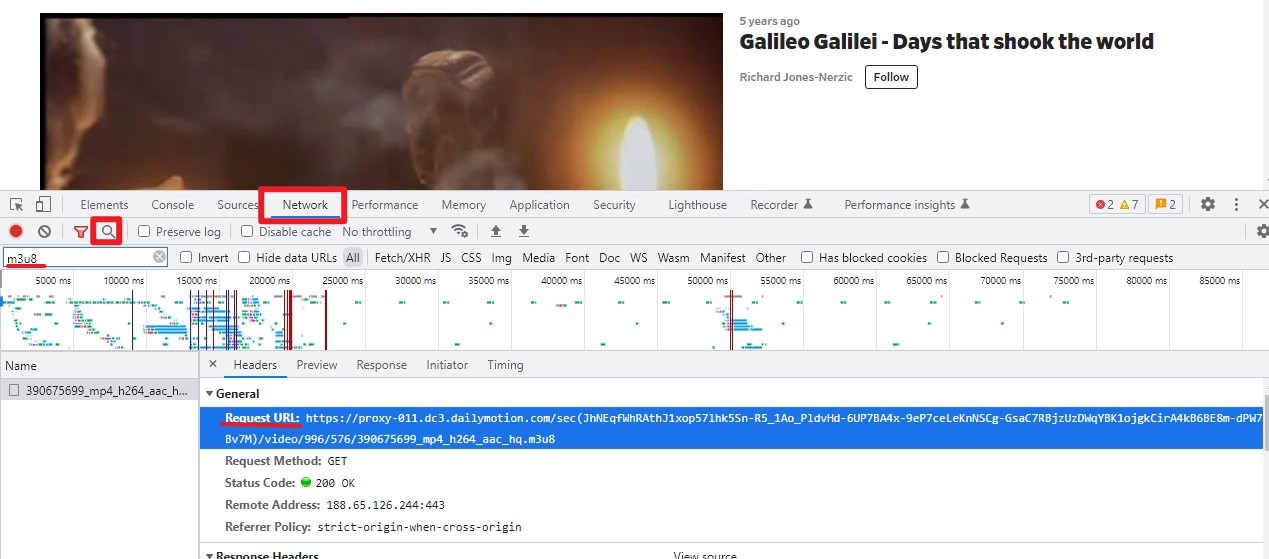
- Use the Chrome browser to enter development mode by pressing F12 on the video playback page (as shown in the picture above).
- Find Network in the console
- Enter M3U8 in the search box
- Copy the value in Request URL and open it in VLC
Reference
How do we download a blob url video [closed]
https://stackoverflow.com/questions/42901942/how-do-we-download-a-blob-url-video
**How to download the video resource of blob address ** https://www.cnblogs.com/mq0036/p/14953209.html