Introduction:
This article records the use of IniParse to read and write ini configuration files in C sharp programming.
Read the Mysql database configuration file in the ini file for database connection:
If you want to read configuration information from an .ini file, you can use a third-party library such as IniParser. Here’s how to do it using the IniParser library:
First, you need to install IniParser using the NuGet package manager. In Visual Studio, you can execute the following command through the NuGet package manager console:
Install-Package IniParser
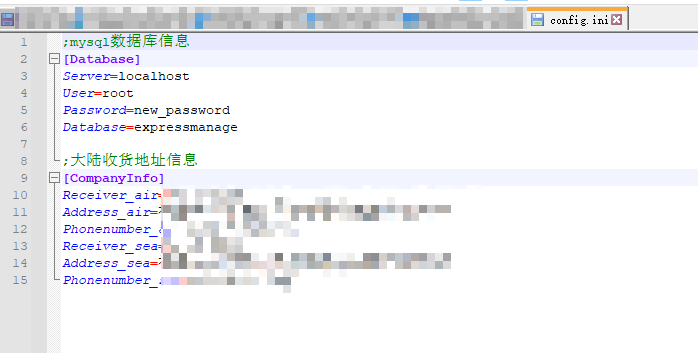
Then, create a config.ini file and add the following content:
[Database]
Server=your_server
User=your_user
Password=your_password
Database=your_database
Next, modify your mysqldata class as follows:
using System;
using IniParser;
using IniParser.Model;
using MySql.Data.MySqlClient;
using Sunny.UI;

namespace ExpressManageSystem
{
    internal class mysqldata
    {
        private static readonly string configFile = "config.ini";
        private static readonly FileIniDataParser parser = new FileIniDataParser();
        private static readonly IniData configData = parser.ReadFile(configFile);

        public static string connection_string
        {
            get
            {
                var databaseSection = configData["Database"];
                return $"server={databaseSection["Server"]};user={databaseSection["User"]};password={databaseSection["Password"]};database={databaseSection["Database"]}";
            }
        }

        public MySqlConnection mySqlConnection = new MySqlConnection(connection_string);

        //连接数据库
        public bool connect_db()
        {
            try
            {
                mySqlConnection.Open();
                return true;
            }
            catch (Exception ex)
            {
                UIMessageBox.Show(ex.Message);
                return false;
            }
        }

        //关闭数据库链接
        public bool close_db()
        {
            try
            {
                mySqlConnection.Close();
                return true;
            }
            catch (Exception ex)
            {
                UIMessageBox.Show(ex.Message);
                return false;
            }
        }
    }
}
In this modified code, the IniParser library is used to read the configuration information in the config.ini file. This way, you can change the database connection information by modifying the config.ini file without modifying the code.
Read the information in the ini file and save it into variables:
Please refer to the sample code
private void CopyExpressInfo()
        {
            try
            {
                if (datagridview_main_information.SelectedRows.Count == 0)
                {
                    MessageBox.Show("请先选择客户");
                    return;
                }
                // 获取选中的行
                DataGridViewRow selectedRow = datagridview_main_information.SelectedRows[0];

                // 获取选中行的数据
                string customercode = selectedRow.Cells["customercode"].Value.ToString();
                //所需要复制的内容
                var configFile = "config.ini"; //定义ini配置文件名称
                var parser = new FileIniDataParser();
                IniData configData = null;

                if (File.Exists(configFile))
                {
                    configData = parser.ReadFile(configFile);

                    //读取CompanyInfo 部分的信息
                    var companyInfoSection = configData["CompanyInfo"];

                    string receiverAir = companyInfoSection["Receiver_air"];
                    string addressAir = companyInfoSection["Address_air"].ToString();
                    string phoneNumberAir = companyInfoSection["Phonenumber_air"];
                    string receiverSea = companyInfoSection["Receiver_sea"];
                    string addressSea = companyInfoSection["Address_sea"].ToString();
                    string phoneNumberSea = companyInfoSection["Phonenumber_sea"];

                    string cnShippinginfo = $"收件人:{receiverAir}\r\n收货地址:{addressAir}({customercode})+空运部\r\n手机号:{phoneNumberAir}     \n" +
                           $" \r\n收件人:{receiverSea} \r\n收货地址:{addressSea}({customercode})+海运部 \r\n手机号:{phoneNumberSea}";
                    //保存到粘贴板
                    Clipboard.SetText(cnShippinginfo);

                    MessageBox.Show($"已成功复制地址信息到剪贴板。");
                }
                else
                {
                    MessageBox.Show("配置文件 config.ini 不存在,系统正在为你重新创建!");
                    configData = new IniData();
                    MessageBox.Show("创建config.ini 成功,请在软件根目录填写相关信息!");
                }
            }
            catch (Exception ex)
            {
                MessageBox.Show($"Error: {ex.Message}");
            }

        }