
After a disconnection, I discovered that the operator had given IPv6
So just remember it
Use Cloudflare to resolve the ipv6 address of your own computer
DDNS parsing open source project
DDNS-go
https://github.com/jeessy2/ddns-go
Please refer to the project page for specific usage.
Features
Support Mac, Windows, Linux systems, support ARM, x86 architecture
Supported domain name service providers
Alidns(阿里云)Dnspod(腾讯云)Cloudflare华为云Support interface/network card to obtain IP
Support running as a service (supported after v2.8.0)
Synchronize every 5 minutes by default
Supports simultaneous resolution of multiple domain names, a must-have for companies
Support multi-level domain names
Configuration in the web page is simple and convenient, you can set
登录用户名和密码/禁止从公网访问It is convenient and quick to view the last 50 logs on the web page without running docker to view them.
Support webhooks
使用展示
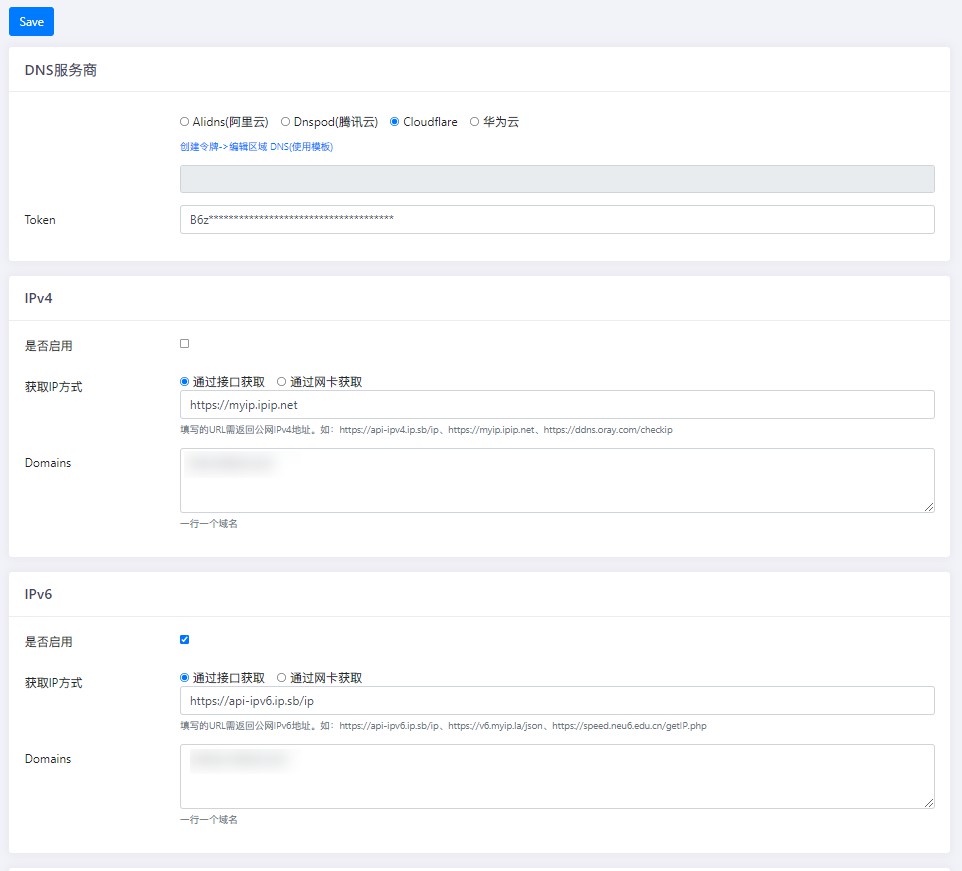
配置好token之后就可以直接通过已经有ipv6地址的朋友直接访问自己的域名了。
当然,如果访问端还没有ipv6的话,是无法访问的。
plan
Plan to learn how Mikrotik uses Cloudeflare to analyze WAN’s ipv6
Reference reading
Comparison of IPv4 and IPv6
https://www.ibm.com/docs/en/i/7.3?topic=6-comparison-ipv4-ipv6
DDNSGO
https://github.com/jeessy2/ddns-go