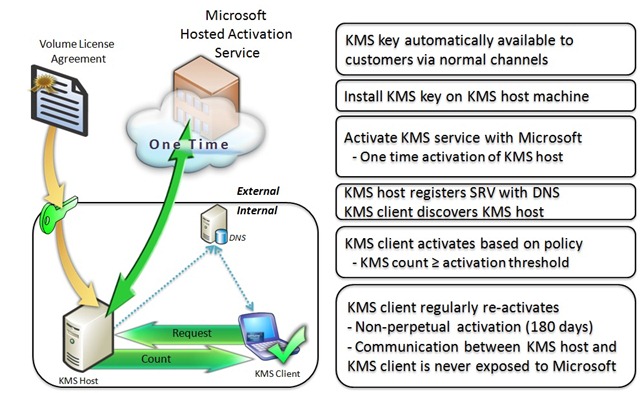
KMS#
KMS activation service, slmgr command activates Windows system and Office
Activation steps (administrator command execution)#
- Setup service
slmgr -skms kms.03k.org - Installation key
slmgr -ipk 版本对应秘钥 - Activate system
slmgr -ato
可用服务#
kms.cangshui.netkms.zme.ink is recommended for use and maintenance. CNAME points to a valid service.telnet kms.zme.ink 1688 Test whether the service is available
key#
https://docs.microsoft.com/zh-cn/windows-server/get-started/kmsclientkeys
Windows Server Semi-Annual Channel Edition#
Windows Server, version 1903, and Windows Server version 1809#
| Operating system version | KMS client installation key |
|---|
| Windows Server Datacenter | 6NMRW-2C8FM-D24W7-TQWMY-CWH2D |
| Windows Server Standard | N2KJX-J94YW-TQVFB-DG9YT-724CC |
Windows Server version 1803#
| Operating system version | KMS client installation key |
|---|
| Windows Server Datacenter | 2HXDN-KRXHB-GPYC7-YCKFJ-7FVDG |
| Windows Server Standard | PTXN8-JFHJM-4WC78-MPCBR-9W4KR |
Windows Server version 1709#
| Operating system version | KMS client installation key |
|---|
| Windows Server Datacenter | 6Y6KB-N82V8-D8CQV-23MJW-BWTG6 |
| Windows Server Standard | DPCNP-XQFKJ-BJF7R-FRC8D-GF6G4 |
Windows Server LTSC/LTSB edition#
Windows Server 2019#
| Operating system version | KMS client installation key |
|---|
| Windows Server 2019 Datacenter | WMDGN-G9PQG-XVVXX-R3X43-63DFG |
| Windows Server 2019 Standard | N69G4-B89J2-4G8F4-WWYCC-J464C |
| Windows Server 2019 Essentials | WVDHN-86M7X-466 P 6-VHXV7-YY726 |
Windows Server 2016#
| Operating system version | KMS client installation key |
|---|
| Windows Server 2016 Datacenter | CB7KF-BWN84-R7R2Y-793K2-8XDDG |
| Windows Server 2016 Standard | WC2BQ-8NRM3-FDDYY-2BFGV-KHKQY |
| Windows Server 2016 Essentials | JCKRF-N37P4-C2D82-9YXRT-4M63B |
In Windows 10, all supported Semi-Annual Channel builds#
| Operating system version | KMS client installation key |
|---|
| Windows 10 Pro | W269N-WFGWX-YVC9B-4J6C9-T83GX |
| Windows 10 Pro N | MH37W-N47XK-V7XM9-C7227-GCQG9 |
| Windows 10 Professional Workstation | NRG8B-VKK3Q-CXVCJ-9G2XF-6Q84J |
| Windows 10 Professional Workstation N | 9FNHH-K3HBT-3W4TD-6383H-6XYWF |
| Windows 10 Pro Education | 6TP4R-GNPTD-KYYHQ-7B7DP-J447Y |
| Windows 10 Pro Education N | YVWGF-BXNMC-HTQYQ-CPQ99-66QFC |
| Windows 10 Education | NW6C2-QMPVW-D7KKK-3GKT6-VCFB2 |
| Windows 10 Education Edition N | 2WH4N-8QGBV-H22JP-CT43Q-MDWWJ |
| Windows 10 Enterprise | NPPR9-FWDCX-D2C8J-H872K-2YT43 |
| Windows 10 Enterprise N | DPH2V-TTNVB-4X9Q3-TJR4H-KHJW4 |
| Windows 10 Enterprise G | YYVX9-NTFWV-6MDM3-9PT4T-4M68B |
| Windows 10 Enterprise G N | 44RPN-FTY23-9VTTB-MP9BX-T84FV |
Windows 10 LTSC/LTSB edition#
Windows 10 LTSC 2019#
| Operating system version | KMS client installation key |
|---|
| Windows 10 Enterprise LTSC 2019 | M7XTQ-FN8P6-TTKYV-9D4CC-J462D |
| Windows 10 Enterprise N LTSC 2019 | 92NFX-8DJQP-P6BBQ-THF9C-7CG2H |
Windows 10 LTSB 2016#
| Operating system version | KMS client installation key |
|---|
| Windows 10 Enterprise LTSB 2016 | DCPHK-NFMTC-H88MJ-PFHPY-QJ4BJ |
| Windows 10 Enterprise N LTSB 2016 | QFFDN-GRT3P-VKWWX-X7T3R-8B639 |
Windows 10 LTSB 2015#
| Operating system version | KMS client installation key |
|---|
| Windows 10 Enterprise 2015 Long Term Servicing | WNMTR-4C88C-JK8YV-HQ7T2-76DF9 |
| Windows 10 Enterprise 2015 Long Term Servicing N | 2F77B-TNFGY-69QQF-B8YKP-D69TJ |
Older versions of Windows Server#
Windows Server 2012 R2#
| Operating system version | KMS client installation key |
|---|
| Windows Server 2012 R2 Server Standard | D2N9P-3P6X9-2R39C-7RTCD-MDVJX |
| WindowsServer 2012 R2 Datacenter | W3GGN-FT8W3-Y4M27-J84CP-Q3VJ9 |
| WindowsServer 2012 R2 Essentials | KNC87-3J2TX-XB4WP-VCPJV-M4FWM |
Windows Server 2012#
| Operating system version | KMS client installation key |
|---|
| Windows Server 2012 | BN3D2-R7TKB-3YPBD-8DRP2-27GG4 |
| Windows Server 2012 N | 8N2M2-HWPGY-7PGT9-HGDD8-GVGGY |
| Windows Server 2012 Single Language Edition | 2WN2H-YGCQR-KFX6K-CD6TF-84YXQ |
| Windows Server 2012 Country-Specific Editions | 4K36P-JN4VD-GDC6V-KDT89-DYFKP |
| Windows Server 2012 Server Standard | XC9B7-NBPP2-83J2H-RHMBY-92BT4 |
| Windows Server 2012 MultiPoint Standard | HM7DN-YVMH3-46JC3-XYTG7-CYQJJ |
| Windows Server 2012 MultiPoint Premium | XNH6W-2V9GX-RGJ4K-Y8X6F-QGJ2G |
| Windows Server 2012 Datacenter | 48HP8-DN98B-MYWDG-T2DCC-8W83P |
Windows Server 2008 R2#
| Operating system version | KMS client installation key |
|---|
| Windows Server 2008 R2 Web Edition | 6TPJF-RBVHG-WBW2R-86QPH-6RTM4 |
| Windows Server 2008 R2 HPC Edition | TT8MH-CG224-D3D7Q-498W2-9QCTX |
| WindowsServer 2008 R2 Standard | YC6KT-GKW9T-YTKYR-T4X34-R7VHC |
| WindowsServer 2008 R2 Enterprise Edition | 489J6-VHDMP-X63PK-3K798-CPX3Y |
| WindowsServer 2008 R2 Datacenter | 74YFP-3QFB3-KQT8W-PMXWJ-7M648 |
| For Windows Server 2008 R2 on Itanium-based systems | GT63C-RJFQ3-4GMB6-BRFB9-CB83V |
Windows Server 2008#
| Operating system version | KMS client installation key |
|---|
| Windows Web Server 2008 | WYR28-R7TFJ-3X2YQ-YCY4H-M249D |
| Windows Server 2008 Standard | TM24T-X9RMF-VWXK6-X8JC9-BFGM2 |
| Windows Server 2008 Standard without Hyper-V | W7VD6-7JFBR-RX26B-YKQ3Y-6FFFJ |
| Windows Server 2008 Enterprise Edition | YQGMW-MPWTJ-34KDK-48M3W-X4Q6V |
| Windows Server 2008 Enterprise without Hyper-V | 39BXF-X8Q23-P2WWT-38T2F-G3FPG |
| Windows Server 2008 HPC | RCTX3-KWVHP-BR6TB-RB6DM-6X7HP |
| Windows Server 2008 Datacenter | 7M67G-PC374-GR742-YH8V4-TCBY3 |
| Windows Server 2008 Datacenter without Hyper-V | 22XQ2-VRXRG-P8D42-K34TD-G3QQC |
| For Windows Server 2008 on Itanium-based systems | 4DWFP-JF3DJ-B7DTH-78FJB-PDRHK |
Earlier versions of Windows#
Windows 8.1#
| Operating system version | KMS client installation key |
|---|
| Windows 8.1 Professional | GCRJD-8NW9H-F2CDX-CCM8D-9D6T9 |
| Windows 8.1 Professional N | HMCNV-VVBFX-7HMBH-CTY9B-B4FXY |
| Windows 8.1 Enterprise | MHF9N-XY6XB-WVXMC-BTDCT-MKKG7 |
| Windows 8.1 Enterprise N | TT4HM-HN7YT-62K67-RGRQJ-JFFXW |
Windows 8#
| Operating system version | KMS client installation key |
|---|
| Windows 8 Professional | NG4HW-VH26C-733KW-K6F98-J8CK4 |
| Windows 8 Professional N | XCVCF-2NXM9-723PB-MHCB7-2RYQQ |
| Windows 8 Enterprise | 32JNW-9KQ84-P47T8-D8GGY-CWCK7 |
| Windows 8 Enterprise N | JMNMF-RHW7P-DMY6X-RF3DR-X2BQT |
Windows 7#
| Operating system version | KMS client installation key |
|---|
| Windows 7 Professional | FJ82H-XT6CR-J8D7P-XQJJ2-GPDD4 |
| Windows 7 Professional N | MRPKT-YTG23-K7D7T-X2JMM-QY7MG |
| Windows 7 Professional E | W82YF-2Q76Y-63HXB-FGJG9-GF7QX |
| Windows7 Enterprise | 33PXH-7Y6KF-2VJC9-XBBR8-HVTHH |
| Windows 7 Enterprise N | YDRBP-3D83W-TY26F-D46B2-XCKRJ |
| Windows 7 Enterprise E | C29WB-22CC8-VJ326-GHFJW-H9DH4 |
Activation instructions#
- KMS activation has a 180-day period, which is called the activation validity interval
- To remain activated, your system must renew activation by connecting to the KMS server at least every 180 days
- By default, activation renewal attempts are automatically made every 7 days
- After renewing client activation, activation validity interval restarts
- To sum up, as long as you are unable to connect to the Internet for more than 180 days, the system will renew itself and remain activated.
Office (VOL version) activation steps (administrator command execution)#
Enter the installation directory cd "C:\Program Files (x86)\Microsoft Office\Office16"
- 32 位默认一般为
C:\Program Files (x86)\Microsoft Office\Office16 - 64 位默认一般为
C:\Program Files\Microsoft Office\Office16 - Office16 是 Office 2016
- Office15 是 Office 2013
- Office14 是 Office 2010
- 打开以上所说的目录,应该有个
OSPP.VBS 文件
Register KMS service cscript ospp.vbs /sethst:kms.zme.ink
Activate Office cscript ospp.vbs /act
Office key list#
Help#
Source#
Original link: https://kms.netnr.com/