I remember that the last time I was taught a lesson by MySQL was 10 years ago, and now I am being taught a lesson by MySQL again. Started at 9am to now 5pm. Finally, MySQL is installed on Windows 10.
MySQL installation
https://dev.mysql.com/downloads/installer/
Just choose the version you want and install it
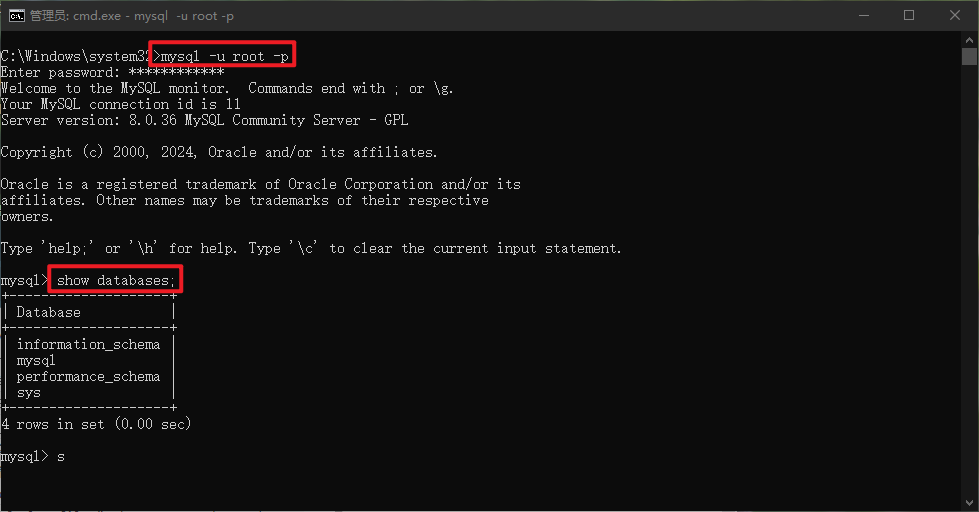
After all installation is completed, you will be prompted to log in through CMD or Navicat.
---date [ERROR] [MY-011084] [Server] Keyring migration failed.
---date [ERROR] [MY-010119] [Server] Aborting
So follow stackoverflow to start the operation https://stackoverflow.com/questions/51448958/mysql-server-8-0-keyring-migration-error-at-login
Following Sabito’s operation, you can log in directly in cmd, but when you start Windows Service and then log in with cmd, the following error will appear.
ERROR 1045 (28000) Access denied for user root@localhost (using password: YES)
Solution
- Stop MySQL service
- Add a new text document named ‘mysqlinit.txt’
在文档中写入以下内容
ALTER USER 'root'@'localhost' IDENTIFIED BY 'new_password'
将该文档拷贝到C: - CMD administrator rights to enter the bin directory of MySQL Server
在cmd窗口输入以下命令 然后回车
--defaults-file="C:\ProgramData\MySQL\MySQL Server 8.0\my.ini" --init-file=C:\\mysqlinit.txt --console
等待命令执行完成,按Ctrl+C 退出CMD 并关闭 - Restart the MySQL service
这个时候就可以使用CMD或者Navicat 登录了
Reference
How to Fix " access denied for user ‘root’@’localhost’ (using password: yes) " in MySQL Window 10
https://www.youtube.com/watch?v=8l2NUwm-OIk
mysql server 8.0 keyring migration error at login
https://stackoverflow.com/questions/51448958/mysql-server-8-0-keyring-migration-error-at-login