
Install Panabit cloud platform on Alibaba Cloud server in five minutes
Just 4 simple steps required
Preparation
You need to prepare the following
** Server** One Alibaba Cloud Freebsd system cloud server [1G1 core 1M is sufficient]
** server link software ** Putty & WinScp are used to upload files and operate the server [You can also use other software]
**PanaCloud independent package ** PanaCloud.tgz
Summary of steps
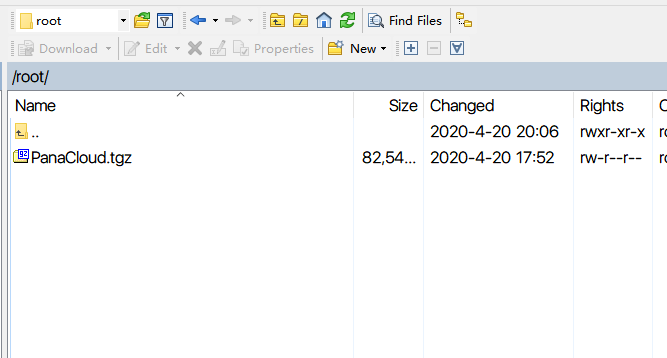
- Upload standalone package to cloud server using Winscp
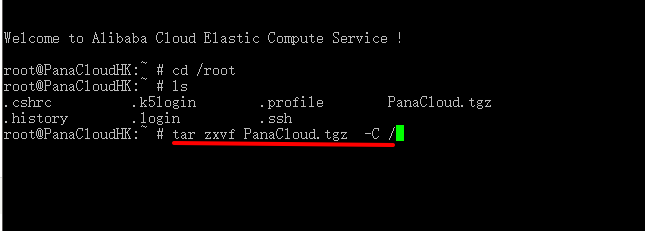
- Unzip the PanaCloud standalone package
- Set the cloud platform to start at startup
- Alibaba Cloud server security group open port
Upload standalone package to cloud server using Winscp
Unzip the PanaCloud standalone package
tar zxvf PanaCloud.tgz -C /
- Set the cloud platform to start at startup
Use the cd command to enter the /etc directory and add it to the rc.local file.
/usr/logd/bin/logd &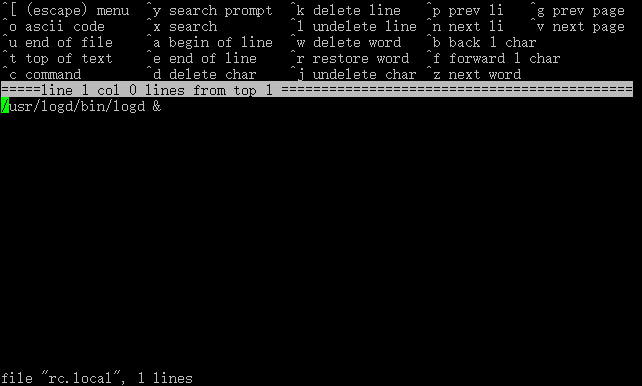
crtl+c Enter exit to exit the save and restart the cloud server to access using the cloud server IP
The open port of the Alibaba Cloud server security group is
22
TCP 24568-34567
UDP 24565-34567
感谢Panabit 刘俊波,以及群内的小伙伴们的解答。
Cloud 独立版文件请咨询Panabit工作人员。