Today, I encountered a new problem when I was dealing with a problem for a customer. A certain program would not work properly if it was not run as an administrator, so I wanted to set all programs to run as an administrator by default. (Note: It is risky to run all programs as an administrator by default. This operation is not recommended for ordinary users.) So after searching Google to get the answer, I verified the operation. Prove it works. Write it down as a note now so you don’t forget it later.
Graphical interface
Run cmd as administrator and enter secpol.msc
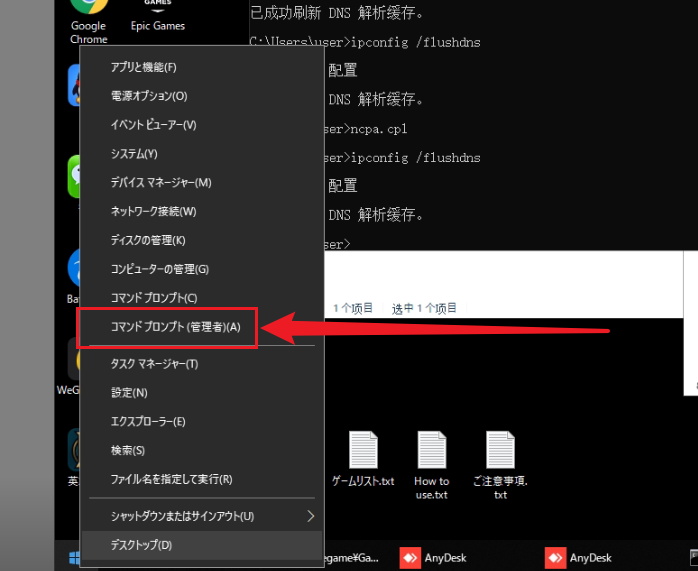
Find “User Account Control: Run all administrators in administrator approval mode” and change it to Disabled
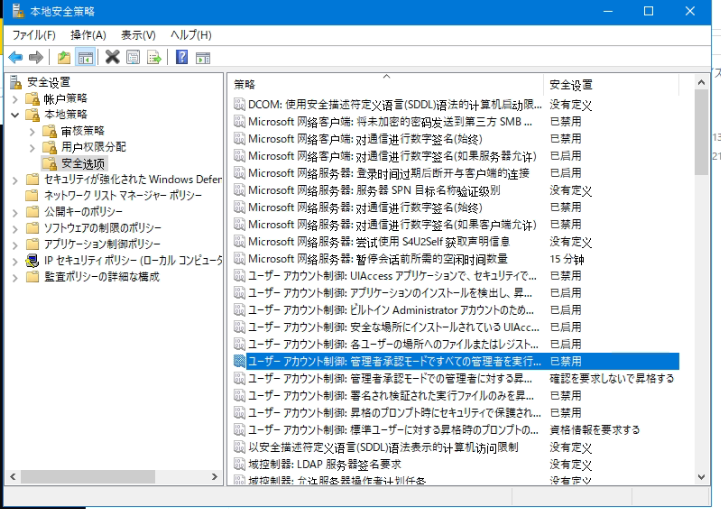
It will take effect after restarting
Reprinted from: https://hulinhong.com/2020/01/01/windows_run_everything_as_admin/
The specific steps for the professional version system are as follows:
Use Cortana to search for secpol or “Local Security Policy” (or run secpol.msc), right-click and select open as administrator (may be required);
Expand Local Policies, select Security Options, find “User Account Control: Run all administrators in administrator approval mode” on the right, double-click it, and change the local security setting to “Disabled”;
Then restart your computer
After completing the operation, execute the command cmd through Win + R. You will find a line of small words “Run as administrator” below the input box.
家庭版系统步骤如下
(如果是家庭版用户没有组策略是无法像上述的专业版系统一样操作的):
Open the registry editor (run regedit), expand the registry to
HKEY_LOCAL_MACHINE\SOFTWARE\Microsoft\Windows\CurrentVersion\Policies\SystemAfter selecting the item System, find EnableLUA on the right and change its value to 0;
Then restart your computer.
After completing the operation, execute the command cmd through Win + R. You will find a line of small words below the input “Run as administrator”